
1 Pages (4 items)
Simple beam analysis, graph - Simple beam analysis, graph - Messages
#1 Posted: 12/14/2025 3:22:09 AM

Hi every one. I have some questions.
Q1) When performing symbolic calculations, I currently have to manually set the optimization to 'numeric' (or 'symbolic'/'none') for each region individually. Is there a way to change the default optimization setting to 'symbolic' or 'none' globally?
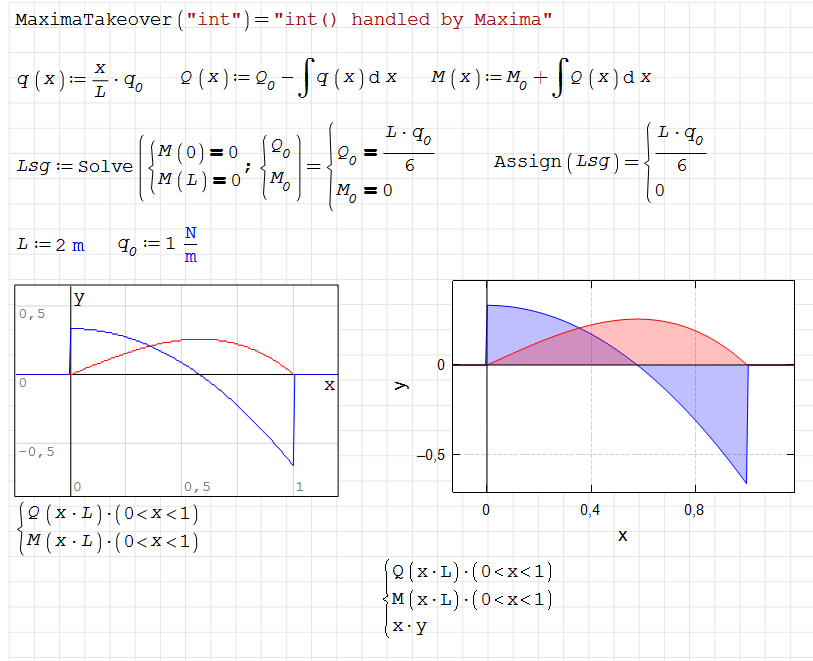
Q2) I have created a worksheet for the SFD and BMD of a simple beam, as shown in the image. I am trying to plot these diagrams using the XY Plot component.How can I restrict the x-axis range to display only the interval from 0 to 1?How can I mark the specific point of M_max on the graph?
Thank you for all.

12.SimpleBeam_01.sm (63.68 KiB) downloaded 893 time(s).
Q1) When performing symbolic calculations, I currently have to manually set the optimization to 'numeric' (or 'symbolic'/'none') for each region individually. Is there a way to change the default optimization setting to 'symbolic' or 'none' globally?
Q2) I have created a worksheet for the SFD and BMD of a simple beam, as shown in the image. I am trying to plot these diagrams using the XY Plot component.How can I restrict the x-axis range to display only the interval from 0 to 1?How can I mark the specific point of M_max on the graph?
Thank you for all.
12.SimpleBeam_01.sm (63.68 KiB) downloaded 893 time(s).
#2 Posted: 12/14/2025 9:48:29 AM
a. From Edit menu select All, then right-click on any blue region and select None from the optimisation section.
b. Double click on the graph and select the various options on the resulting menu - see attached.
12.SimpleBeam_01b.sm (86.53 KiB) downloaded 926 time(s).
b. Double click on the graph and select the various options on the resulting menu - see attached.
12.SimpleBeam_01b.sm (86.53 KiB) downloaded 926 time(s).
1 users liked this post
kimkim 12/14/2025 10:31:17 AM
#3 Posted: 12/14/2025 10:35:04 AM
Wrotea. From Edit menu select All, then right-click on any blue region and select None from the optimisation section.
b. Double click on the graph and select the various options on the resulting menu - see attached.
12.SimpleBeam_01b.sm (86.53 KiB) downloaded 926 time(s).
I'm so appreciative of you.
When I draw SDF, BMD,' roots' function is more efficient than 'Solve' function as you wrote!!
Thank you.
#4 Posted: 12/17/2025 10:39:59 PM
Technische Mechanik mit SMath Studio: https://link.springer.com/book/10.1007/978-3-658-50592-9
1 Pages (4 items)
- New Posts
- No New Posts