
1 страниц (8 вхождений)
does not lauch AppImage - latest version April 4 AppImage didn't launch nor did extracted Squashfs/Root/Apprun - Сообщения

SMathStudioDesktop.1_3_0_9126.x86_64.ubuntu-22_04.glibc2.35.AppImage downloaded April 4 7 AM CDT
double click didn't launch click and bring up list no run on top
followed procedure and still didn't launch
by BenTrabetere » Tue Jul 18, 2023 11:18 am
Another option to try is to extract the AppImage - open a terminal, navigate to the directory where the AppImage resides, and enter ./SMathStudioDesktop.1_3_0_9126.x86_64.ubuntu-22_04.glibc2.35.AppImage --appimage-extract. This will extract the contents of the AppImage to a directory named squashfs-root. Change to this directory with cd squashfs-root, and enter ./AppRun.wrapped to launch the program.
the extraction list showed and verified with pwd squashfs/root/AppRun was what was extracted missing is the .wrapped
I am a new first time joined any forum. First time installed any Linux Mint Cinnamon or any operating system. Only positive thing started with a Commandor 64
double click didn't launch click and bring up list no run on top
followed procedure and still didn't launch
by BenTrabetere » Tue Jul 18, 2023 11:18 am
Another option to try is to extract the AppImage - open a terminal, navigate to the directory where the AppImage resides, and enter ./SMathStudioDesktop.1_3_0_9126.x86_64.ubuntu-22_04.glibc2.35.AppImage --appimage-extract. This will extract the contents of the AppImage to a directory named squashfs-root. Change to this directory with cd squashfs-root, and enter ./AppRun.wrapped to launch the program.
the extraction list showed and verified with pwd squashfs/root/AppRun was what was extracted missing is the .wrapped
I am a new first time joined any forum. First time installed any Linux Mint Cinnamon or any operating system. Only positive thing started with a Commandor 64
#19 I used the modified file from Overlord and ran the command export MONO_WINFORMS_XIM_STYLE=disabled beforehand. The application opens, but after a few minutes, it crashes and closes.
I have no idea what Overlord is. Is this a linux terminal script? and It would be an exported from what to what? And it dosen't work so it isn't a solution.
I am starting and I could switch distros, however; I do want KDE Connect to work for my android phone and FreeCAD.
I have no idea what Overlord is. Is this a linux terminal script? and It would be an exported from what to what? And it dosen't work so it isn't a solution.
I am starting and I could switch distros, however; I do want KDE Connect to work for my android phone and FreeCAD.
Which distro are you using right now? Without this info, it will be hard to help.
And I can't quite figure out what some of the things you've written mean.
How is SMath is related with KDE Connect and FreeCAD?
These two great opensource program is totally unrelated with SMath.
Switching distros wouldn't change their behavior, they will work at your new distro too.
And I can't quite figure out what some of the things you've written mean.
How is SMath is related with KDE Connect and FreeCAD?
These two great opensource program is totally unrelated with SMath.
Switching distros wouldn't change their behavior, they will work at your new distro too.
I have Linux Mint Cinnamon.
On Brave browser you automatically get an Ai answer I believe you are the the writer of the response Mint is I believe a Ubuntu and Deblan offspring. I have no idea where to find {#/bin/sh} I assume it is the {SMathStudioDesktop.1_3_0_9126Mono.tar.gz} that I open in the text editor and look for the file of that name? In the Is it added or replaces what is there?
The most significant file modification by Overlord for SMath Studio is the smathstudio_desktop_mono shell script, which is edited to resolve Mono runtime bugs on Debian-based distributions like Ubuntu. This script disables the MONO_WINFORMS_XIM_STYLE environment variable to prevent crashes and ensures the application runs correctly without requiring sudo privileges.
To apply this fix, users must edit the smathstudio_desktop_mono file using a text editor (such as vim, nano, or kate) and replace its contents with the following code:
{#!/bin/sh
export MONO_WINFORMS_XIM_STYLE=disabled
exec mono "./SMathStudio_Desktop.exe" "$@"}
For users who prefer a custom launcher or need to specify the working directory explicitly, Overlord and other community members have suggested a more robust version that changes to the script's directory before execution:
{#!/bin/sh
HERE="$(dirname "$(readlink -f "${0}")")"
cd "${HERE}"
export MONO_WINFORMS_XIM_STYLE=disabled
exec mono "${HERE}/SMathStudio_Desktop.exe" "$@"}
This modification is particularly critical for Ubuntu 22.04 and other Debian-based systems where the standard Mono configuration often fails to launch the application. Additionally, Overlord has created specific Big Integer and Big Rational Arithmetic plugins that extend SMath's functionality, though these are separate from the core execution script modification.
Elaborate
Overlord's contributions to SMath Studio are primarily focused on resolving Linux compatibility issues and developing advanced mathematical plugins.
Core Application Fix
The primary modification is to the smathstudio_desktop_mono shell script, essential for running SMath Studio on Debian-based distributions like Ubuntu. The standard installation often fails to launch due to a Mono runtime bug related to input methods. Overlord's fix involves editing the script to set an environment variable and ensure the correct working directory:
{#!/bin/sh
export MONO_WINFORMS_XIM_STYLE=disabled
exec mono "./SMathStudio_Desktop.exe" "$@"}
For a more robust solution, especially when using desktop launchers, the script is enhanced to dynamically determine its location:
{#!/bin/sh
HERE="$(dirname "$(readlink -f "${0}")")"
cd "${HERE}"
export MONO_WINFORMS_XIM_STYLE=disabled
exec mono "${HERE}/SMathStudio_Desktop.exe" "$@"}
On Brave browser you automatically get an Ai answer I believe you are the the writer of the response Mint is I believe a Ubuntu and Deblan offspring. I have no idea where to find {#/bin/sh} I assume it is the {SMathStudioDesktop.1_3_0_9126Mono.tar.gz} that I open in the text editor and look for the file of that name? In the Is it added or replaces what is there?
The most significant file modification by Overlord for SMath Studio is the smathstudio_desktop_mono shell script, which is edited to resolve Mono runtime bugs on Debian-based distributions like Ubuntu. This script disables the MONO_WINFORMS_XIM_STYLE environment variable to prevent crashes and ensures the application runs correctly without requiring sudo privileges.
To apply this fix, users must edit the smathstudio_desktop_mono file using a text editor (such as vim, nano, or kate) and replace its contents with the following code:
{#!/bin/sh
export MONO_WINFORMS_XIM_STYLE=disabled
exec mono "./SMathStudio_Desktop.exe" "$@"}
For users who prefer a custom launcher or need to specify the working directory explicitly, Overlord and other community members have suggested a more robust version that changes to the script's directory before execution:
{#!/bin/sh
HERE="$(dirname "$(readlink -f "${0}")")"
cd "${HERE}"
export MONO_WINFORMS_XIM_STYLE=disabled
exec mono "${HERE}/SMathStudio_Desktop.exe" "$@"}
This modification is particularly critical for Ubuntu 22.04 and other Debian-based systems where the standard Mono configuration often fails to launch the application. Additionally, Overlord has created specific Big Integer and Big Rational Arithmetic plugins that extend SMath's functionality, though these are separate from the core execution script modification.
Elaborate
Overlord's contributions to SMath Studio are primarily focused on resolving Linux compatibility issues and developing advanced mathematical plugins.
Core Application Fix
The primary modification is to the smathstudio_desktop_mono shell script, essential for running SMath Studio on Debian-based distributions like Ubuntu. The standard installation often fails to launch due to a Mono runtime bug related to input methods. Overlord's fix involves editing the script to set an environment variable and ensure the correct working directory:
{#!/bin/sh
export MONO_WINFORMS_XIM_STYLE=disabled
exec mono "./SMathStudio_Desktop.exe" "$@"}
For a more robust solution, especially when using desktop launchers, the script is enhanced to dynamically determine its location:
{#!/bin/sh
HERE="$(dirname "$(readlink -f "${0}")")"
cd "${HERE}"
export MONO_WINFORMS_XIM_STYLE=disabled
exec mono "${HERE}/SMathStudio_Desktop.exe" "$@"}
Отредактировано 21.04.2026 18:49:10
I am downloading Linux Mint 22.3 Cinnamon right now.
I am going to try appimages in it and look for source of problem.
And I will edit this reply once I check what is going on.
Regards
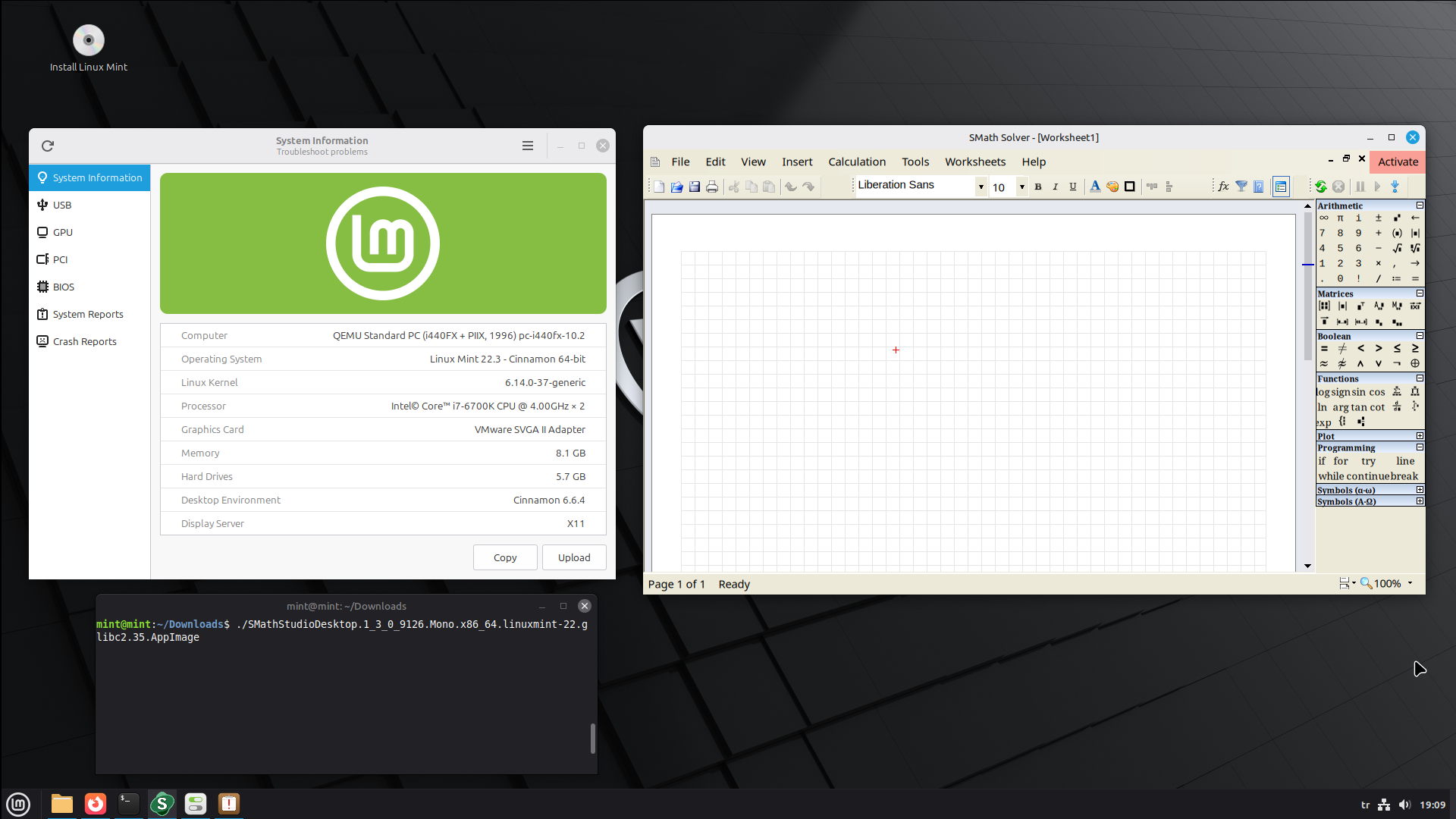
PS: I tried appimage with linuxmint_22.3-cinnamon iso on qemu, live session.
Appimage runs with no problem, I tried to run it on terminal. Then I double clicked Appimage just to try.
Everything works just fine. We can't know what is wrong unless you provide some logs.
I am going to try appimages in it and look for source of problem.
And I will edit this reply once I check what is going on.
Regards
PS: I tried appimage with linuxmint_22.3-cinnamon iso on qemu, live session.
Appimage runs with no problem, I tried to run it on terminal. Then I double clicked Appimage just to try.
Everything works just fine. We can't know what is wrong unless you provide some logs.
Отредактировано 21.04.2026 19:34:32
failure to launch SMathStudio AppImage.txt (4,07 КиБ) скачан 500 раз(а). I booted on a 16GB USB drive and loaded SMathStudio on the drive with Mint Cinnamon. Didn't launch. It has permission checked for the USB drive and on the HP Envy. I did check and also down load and installed libfuse2 before trying to run on Envy. It was already installed. Tried running from the terminal on Envy with the results the attached dump.
As I have already said, I can run smath appimage in a qemu linuxmint22.3-cinnamon virtual machine.
Even though appimages have libgdiplus.so file in them, somehow some computers simply ignore it.
Here is the contents of the appimage, you can see libgdiplus is already included.
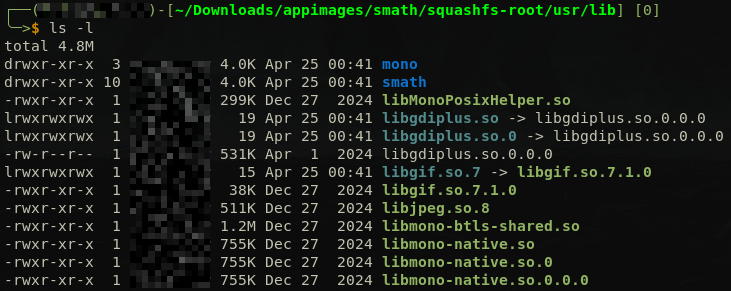
Your terminal output file indicates libgdiplus file couldn't be found.
Install libgdiplus with sudo apt update && sudo apt install libgdiplus and try again to run appimage.
If this doesn't work, skip to below.
For your information, there is also a longer and guarantee to work method.
SMath is not the problem here. Mono installation of Debian based distros is the culprit.
You need to compile and install mono yourself, manually. I assure you this will work.
https://smath.com/en-US/forum/topic/QGuTDE-last/Cannot-run-in-Ubuntu-22_04#msg143067
Even though appimages have libgdiplus.so file in them, somehow some computers simply ignore it.
Here is the contents of the appimage, you can see libgdiplus is already included.
Your terminal output file indicates libgdiplus file couldn't be found.
Install libgdiplus with sudo apt update && sudo apt install libgdiplus and try again to run appimage.
If this doesn't work, skip to below.
For your information, there is also a longer and guarantee to work method.
SMath is not the problem here. Mono installation of Debian based distros is the culprit.
You need to compile and install mono yourself, manually. I assure you this will work.
https://smath.com/en-US/forum/topic/QGuTDE-last/Cannot-run-in-Ubuntu-22_04#msg143067
Отредактировано 24.04.2026 21:59:28
1 страниц (8 вхождений)
- Новые сообщения
- Нет новых сообщений