
1页(8条)
New SMath file in specified folder? - context menu New, or equivalent - 消息

I'm hoping that it is possible to call SMath with command line arguments to open a new SMath file in a specified working folder.
Thanks,
Matt Wheeler
Thanks,
Matt Wheeler
WroteI'm hoping that it is possible to call SMath with command line arguments to open a new SMath file in a specified working folder.
From the f(x) menu ... include(arg1) from the same directory.
Genfit Algo Include.sm (36.12 KiB)已下载 1182 次。
Genfit Algo Include Test UpDated.sm (88.36 KiB)已下载 1192 次。
WroteI'm hoping that it is possible to call SMath with command line arguments to open a new SMath file in a specified working folder.
What Jean said ... Don't forget that they are "HARD Linked (no relative) and you need the equals sign

My use case is this:
1. I navigate to a project folder in my explorer.
2. Decide I need to do a calculation.
3. ... How can I open a new SMath file in that folder, or save it to that folder, without re-navigating to it when I save the file?
I'm just trying to save some redundant file tree navigation.
I can't tell if the suggestions above relate to this or not.
Thanks
Not possible. The examples are how to "link" a worksheet in a different directory to this sheet.
I tend to save everything to desktop and them move to where it's needed
I tend to save everything to desktop and them move to where it's needed
Hi. What you describe it's the windows "ShellNew" feature. It seems that SMath have something implemented for do that, but maybe there are something missing, probably the "FileName" entry, and some *.sm template for creating the new document. This is the registry entry, under HKEY_CLASSES_ROOT:
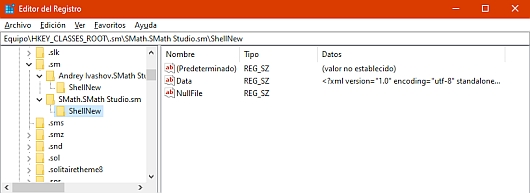
Best regards.
Alvaro.
Best regards.
Alvaro.
WroteMy use case is this:
1. I navigate to a project folder in my explorer.
2. Decide I need to do a calculation.
3. ... How can I open a new SMath file in that folder, or save it to that folder, without re-navigating to it when I save the file?
I'm just trying to save some redundant file tree navigation.
I can't tell if the suggestions above relate to this or not.
=================== NOT clear !
You can have several instances of Smath opened.
As you open PC, Smath you get a blank sheet named page 1
click on page menu you get a new blank work sheet and you start working
your project. If you need to work scratch pad, click on page 1
then go back to your project document, that's my morning cup of tea.
As I work the new project or continue on an existing one,
from the menu "Recent files" I can open more for supporting the work.
... all that is a single instance of Smath.
Now, as I visit the Forum, download some document from Collabs,
this new document(s) are saved automatically in Windows "Downloads"
Each downloaded document opens a new Smath instance and from there,
if I need a free scratch pad, click on menu "Page new"
==============
So, from your morning start/continue on an existing project,
"what you want to do" [pretty Colonial English].
Hi. Here it's the windows registry modification for a working version of ShellNew:
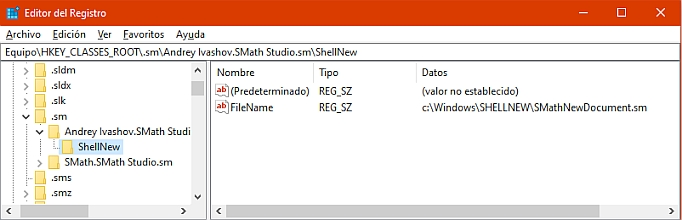
Create a .sm file for use it as template and save it somewhere, for example, as c:\Windows\SHELLNEW\SMathNewDocument.sm. Next, edit windows registry and under \HKEY_CLASSES_ROOT\.sm\Andrey Ivashov.SMath Studio.sm\ShellNew add a new value "FileName" pointing to your template, as in the figure.
Maybe you must to restart, or not, but what you get now is a working ShellNew for .sm files in the contextual menu for the windows explorer:
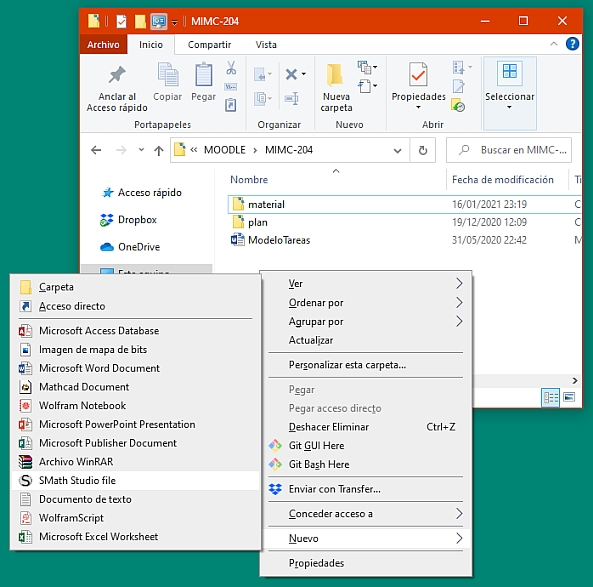
Notice that the file created isn't an empty file (which could return an error while open) but your template file.
Best regards.
Alvaro.
Create a .sm file for use it as template and save it somewhere, for example, as c:\Windows\SHELLNEW\SMathNewDocument.sm. Next, edit windows registry and under \HKEY_CLASSES_ROOT\.sm\Andrey Ivashov.SMath Studio.sm\ShellNew add a new value "FileName" pointing to your template, as in the figure.
Maybe you must to restart, or not, but what you get now is a working ShellNew for .sm files in the contextual menu for the windows explorer:
Notice that the file created isn't an empty file (which could return an error while open) but your template file.
Best regards.
Alvaro.
1页(8条)
- 有新帖
- 无新帖