
1页(7条)
Problem iterating - 消息

Dear all,
Thanks for your great help!!
In this sample, when I iterate to find θ, I have no problem at the first time.
test.sm (28.77 KiB)已下载 1201 次。
Then, when I want to calculate SM matrix, something goes wrong:
- Do you know what is the problem?
- The expression to find θ and SM is the same. Could I use only one expression to calculate these 2 variables?
Then, if y change Cm coefficients in order to find a new θ value, the expression don't work,
- I'm lost
Some feedback?? Thanks in advance!
WroteDear all,
Then, when I want to calculate SM matrix, something goes wrong:
- Do you know what is the problem?
- The expression to find θ and SM is the same. Could I use only one expression to calculate these 2 variables?
Hi. Actually I can't find why your code don't works, it looks fine to me. But, some problem have, because the error message. About to use only one expression for both, I guess that this is the solution:
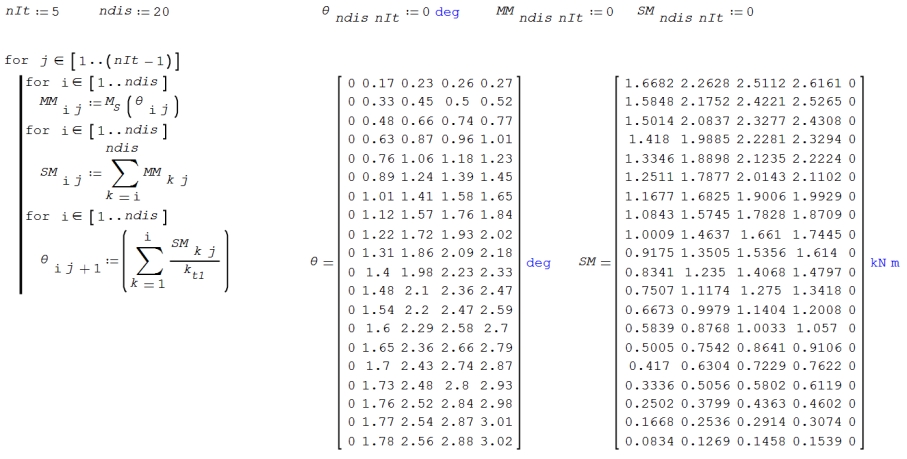
Hope this helps.
Best regards.
Alvaro.
WroteDear all,
Then, if y change Cm coefficients in order to find a new θ value, the expression don't work,
- I'm lost
Your first calulation block return theta AND assin it to theta - if your block has finished you have calculated matrizes theta, MM, SM it is not necessary to assin theta again
I think you made a endless loop in the 2. block
make assinments to theta and SM return SM and assign it to itself. Removing the assinment of the blocks.
BTW. what is the difference in calculation SM in 2. block to the one in 1. block?
seems to me SM is ident in both cases
From Newby to Newby ;-)
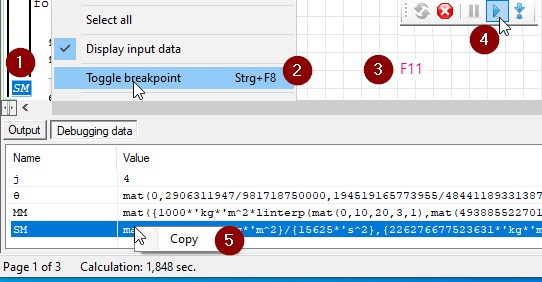
Start Debugger
1. mark code line
2. set breakpoint
3. start debugger F11
4. continue to breakpoint
5. copy to empty page (better to a 2. instance runing) to examine what you have
2位用户喜欢此帖子

The error happens because inside the SM procedure (it's a procedure when line is used on the RHS of a variable) you are trying to assign a matrix element to an existing scalar (Θ, defined in the procedure right above). To avoid it, you should initialize the nested variables before using them, f.e. using or
If the existing variable θ was already a matrix, you would have ended overwriting the original values without warnings. This is a powerful feature of the program but if you are not aware of it you might end with some crazy results.
In general when you are inside a function or a procedure it's a good practice to always initialize the variables that are meant to be "local"; if you want to inherit a variable and change his value(s) only locally you have to assign it to a local variable. Obviously it can be avoided, if you are aware of the behaviors and you are sure there won't be any accidental inheritance/interference in the worksheet, like for small examples and such.
Θ:matrix(rows, columns) Clear(θ,...)If the existing variable θ was already a matrix, you would have ended overwriting the original values without warnings. This is a powerful feature of the program but if you are not aware of it you might end with some crazy results.
In general when you are inside a function or a procedure it's a good practice to always initialize the variables that are meant to be "local"; if you want to inherit a variable and change his value(s) only locally you have to assign it to a local variable. Obviously it can be avoided, if you are aware of the behaviors and you are sure there won't be any accidental inheritance/interference in the worksheet, like for small examples and such.
If you like my plugins please consider to support the program buying a license; for personal contributions to me: paypal.me/dcprojects
WroteThen, if y change Cm coefficients in order to find a new θ value, the expression don't work,
- I'm lost
Best never used the consumed variables
Your 3 data sets from doctored ?
test (4 try this).sm (36.31 KiB)已下载 1202 次。
Hi,
Thanks everyone for your help!
Understood, it's better to clear the matrix to re-use it.
Jean, your file shows black sentences in my computer.

Thanks everyone for your help!
Understood, it's better to clear the matrix to re-use it.
Jean, your file shows black sentences in my computer.
WroteJean, your file shows black sentences in my computer.
That's the mutual freak between 7251 6179 and vice versa.
Select all, background white.
1页(7条)
- 有新帖
- 无新帖