
noob question - How to get intermediate formula - 消息

Greetings Jean Giraud. I mean by "analytic", to write a function "func (arg)" using strictly the functions defined in smath (other than "Clear (arg)") whose result is identical to that provided by the predefined function in smath "Clear (arg)"
Analytical function(s) are function(s) that you can:
derive, integrate, Laplace, Fourier, else transform ... etc.
Clear(▪,▪,▪, ...) simply evaporates the collection.
What you can do: front end a program by Clear(▪,▪,▪, ...)
If your program is analytical, de-facto Clear is analytical,
that is for twisted mind... glass ½ full/empty.
Cheers ... Jean.
derive, integrate, Laplace, Fourier, else transform ... etc.
Clear(▪,▪,▪, ...) simply evaporates the collection.
What you can do: front end a program by Clear(▪,▪,▪, ...)
If your program is analytical, de-facto Clear is analytical,
that is for twisted mind... glass ½ full/empty.
Cheers ... Jean.
Once the vector 'x' has been cleared ▼ internally
'x' is free for analytic/numeric function(s)...
If that's what you mean by analytic Clear(,)
If you have comments or more in mind ... welcome.
Cheers ... Jean.
Maths Clear.sm (22.25 KiB)已下载 1326 次。
'x' is free for analytic/numeric function(s)...
If that's what you mean by analytic Clear(,)
If you have comments or more in mind ... welcome.
Cheers ... Jean.
Maths Clear.sm (22.25 KiB)已下载 1326 次。
Wrote... Clear(âª,âª,âª, ...) simply evaporates the collection ...
OK. Then why doesn't this function exist in MathCAD - at least until MathCAD 14, which I use. In fact, that would be the basic idea. How do I synthesize such a function in MathCAD, a function that I often miss ?!
WroteOK. Then why doesn't this function exist in MathCAD - at least until MathCAD 14, which I use. In fact, that would be the basic idea. How do I synthesize such a function in MathCAD, a function that I often miss ?!
Mathcad 14 was a freak. Saved as 11 ... back 11 was Christmas decoration !
At Mathsoft home, my MCD 11 crashed Mona MCD 14.
Mathcad 11 was a semi-compiled CAS, much different than Smath Plugins.
In Mathcad 11 and earlier, variables, data don't reside, nothing to Clear.
If 'x' has been ranged above and next you want the symbolic wrt 'x'
x:= ▪
it shows the place holder, then evaporated, free for symbolic.
Don't hesitate for more ... Jean.
OK. Many thanks Jean Giraud

Greetings,
Another solution was just posted as a worksheet example, located here: https://en.smath.com/forum/yaf_postsm80591_Showing-substitutions-in-a-formula.aspx#post80591
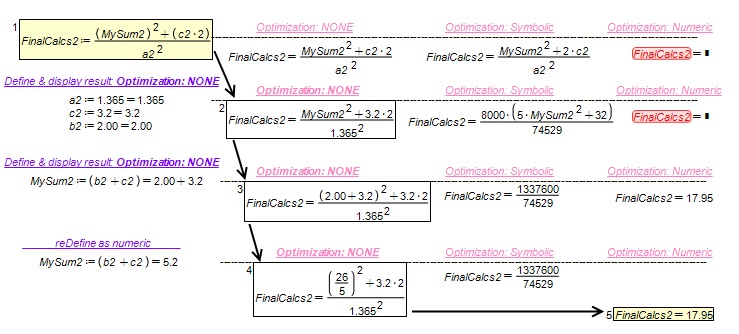
As an additional observation to this whole topic, I achieved sufficient success if I did the following (without the need for a plugin or special functions):
Depending on your circumstance, utilizing Symbolic evaluation and calling the function Eval() may be in your best interest.
Hope this helps;
Kenny Lemens, P.E. ᵂᴵ
Another solution was just posted as a worksheet example, located here: https://en.smath.com/forum/yaf_postsm80591_Showing-substitutions-in-a-formula.aspx#post80591
WroteHi Kenny, thanks. It is absolutely true, I completely forgot that the purpose is necessarily not only to show the calculation, but to use it later. Well, though, at least it's not a 3-order-of-magnitude error, like the one I recently had.
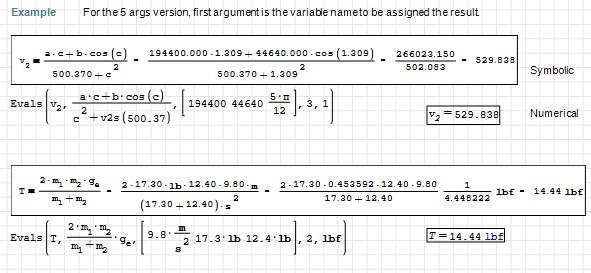
This version saves in the first argument the numerical value of the evaluated formula. The rest of the code and the behavior stays the same.
Evals v2.sm (65.95 KiB)已下载 1993 次。
Evals v2.pdf (147.21 KiB)已下载 1190 次。
Best regards.
Alvaro.
As an additional observation to this whole topic, I achieved sufficient success if I did the following (without the need for a plugin or special functions):
- defining the equations before declaring any of the variables
- defining the variables and display evaluation immediately (optimization=NONE)
- display the equation, define optimization=NONE
- Final: display the equation, define optimization=numeric
Depending on your circumstance, utilizing Symbolic evaluation and calling the function Eval() may be in your best interest.
Hope this helps;
Kenny Lemens, P.E. ᵂᴵ
"No matter where you go, there you are." -Buckaroo BanzaiHotkeys: https://en.smath.com/forum/resource.ashx?a=45771&b=2
2位用户喜欢此帖子
- 有新帖
- 无新帖