
1页(3条)
[Table Region] Caption Font Size Problem with Windpws Display Scale - 消息

In latest SS "0.99.7921.69".
Following error occurs when Win 10 Home Edition display scale adjusted to 125% in my second large monitor.
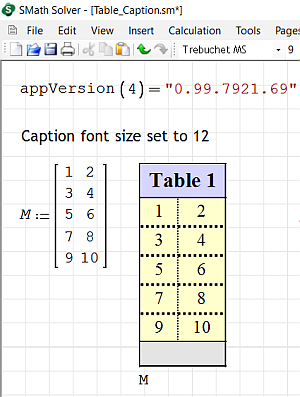
The Table Caption Font Size originally set to 12.
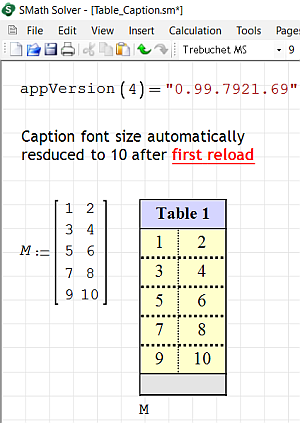
But with first reload, the caption font reduces.
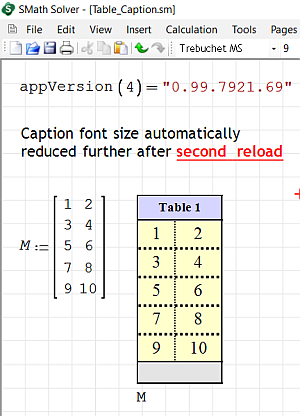
If the resulting SS file is saved and reloaded, the caption font size reduces further.
This process repeatedly occurs with each save and reloading, ending up with non readable caption.
No such error with display scale set to 100%
Following error occurs when Win 10 Home Edition display scale adjusted to 125% in my second large monitor.
The Table Caption Font Size originally set to 12.
But with first reload, the caption font reduces.
If the resulting SS file is saved and reloaded, the caption font size reduces further.
This process repeatedly occurs with each save and reloading, ending up with non readable caption.
No such error with display scale set to 100%
Look within!... The secret is inside you.
Best Regards
Eng. NDTM Amarasekera - Sri Lanka

Not yet able to reproduce but I'm investigating it, thank you for reporting the issue.
If you like my plugins please consider to support the program buying a license; for personal contributions to me: paypal.me/dcprojects
Hello Davide,
There was an alternate method in the internet to increase the font size.
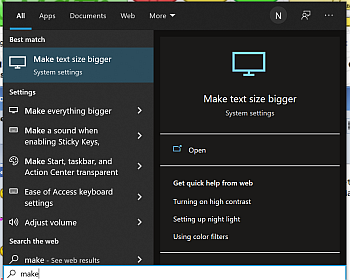
It says to click on Windows logo and type "Make Text size bigger" and
adjusted font size to 125% as shown.
This method solved my problem.
Thank you.
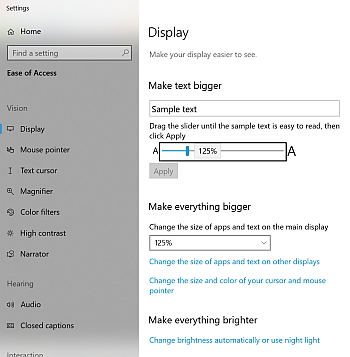
There was an alternate method in the internet to increase the font size.
It says to click on Windows logo and type "Make Text size bigger" and
adjusted font size to 125% as shown.
This method solved my problem.
Thank you.
Look within!... The secret is inside you.
Best Regards
Eng. NDTM Amarasekera - Sri Lanka
1页(3条)
- 有新帖
- 无新帖