
1页(3条)
Additional texts on a diagram - selection - 消息

Hi,
I sometimes put some additional descriptions on a diagram. I simply put there text fields. The problem is that they cannot be selected separately if there is a diagram below them. So after putting such description on a diagram I cannot move it any more as always diagram is selected.
I sometimes put some additional descriptions on a diagram. I simply put there text fields. The problem is that they cannot be selected separately if there is a diagram below them. So after putting such description on a diagram I cannot move it any more as always diagram is selected.

You can have that, all commended from outside the plot.
Change yellow °C:=100 for °C:=200, see what happens on graph.
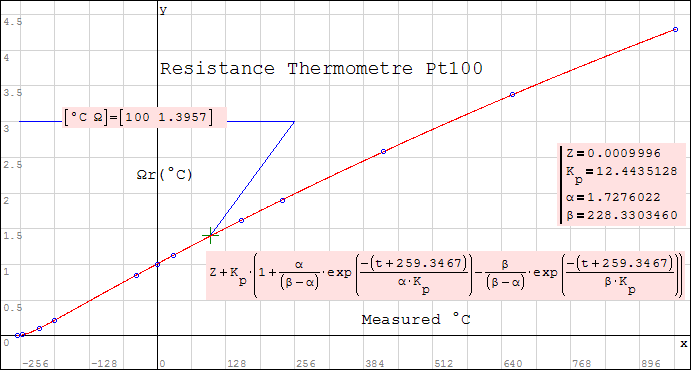
Inst_Type Pt100 Copy.sm (58.39 KiB)已下载 1643 次。
Change yellow °C:=100 for °C:=200, see what happens on graph.
Inst_Type Pt100 Copy.sm (58.39 KiB)已下载 1643 次。
You can use TAB or Shift-TAB to move the focus from region to region. Once a region has focus, you can edit as usual (use arrow keys to move cursor) and you can grab the region border with the mouse to move it.
Alternatively, you can select the text region and the overlapping plot with the mouse (both are light blue, then press ctrl to extend the selection (in this case use this to deselect the plot. Then only the text region remains highlighted. In this state you can move it around using the arrow keys.
Alternatively, you can select the text region and the overlapping plot with the mouse (both are light blue, then press ctrl to extend the selection (in this case use this to deselect the plot. Then only the text region remains highlighted. In this state you can move it around using the arrow keys.
Technische Mechanik mit SMath Studio: https://link.springer.com/book/10.1007/978-3-658-50592-9
1页(3条)
- 有新帖
- 无新帖