
1页(4条)
How to eliminate the effect of previously defined variables - 消息

The two equations in the left part of the image are belong to a long document, the β and ζ are previously defined. I want to get derivate of Rd(β), but it always give me the wrong results,
I have to paste them into a new document (in the right part of the image), where the β and ζ are not previously defined, then I can get the correct answer.
If I want to get the correct result in the original document, how to eliminate the effect of previously defined variables (β and ζ)?
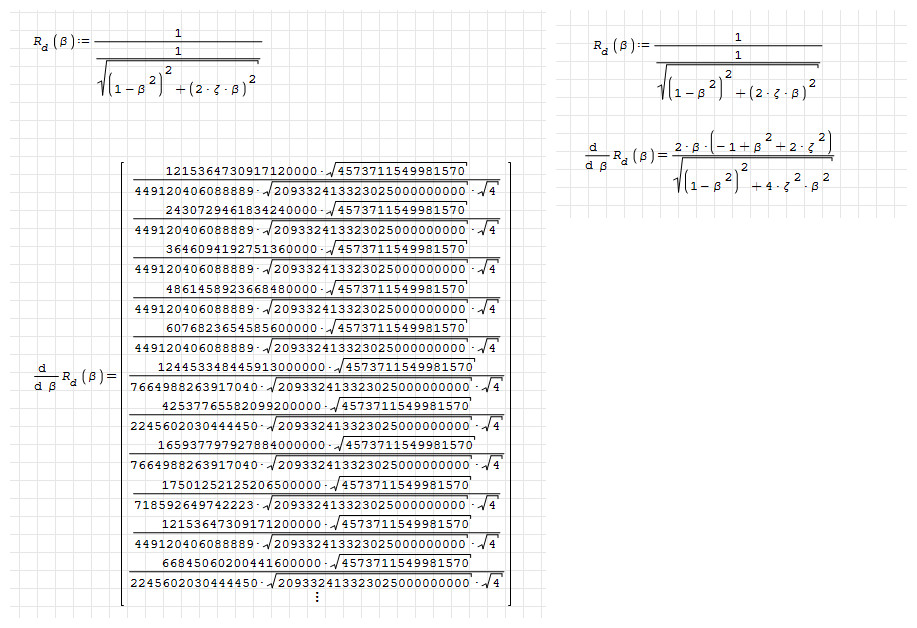
I have to paste them into a new document (in the right part of the image), where the β and ζ are not previously defined, then I can get the correct answer.
If I want to get the correct result in the original document, how to eliminate the effect of previously defined variables (β and ζ)?

use Clear() function and evaluate:
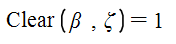
When this function is evaluated, the value of arguments in the function are cleaned.
Regards,
Oscar
When this function is evaluated, the value of arguments in the function are cleaned.
Regards,
Oscar
已编辑 2025/8/31 10:01:48
Thanks, but
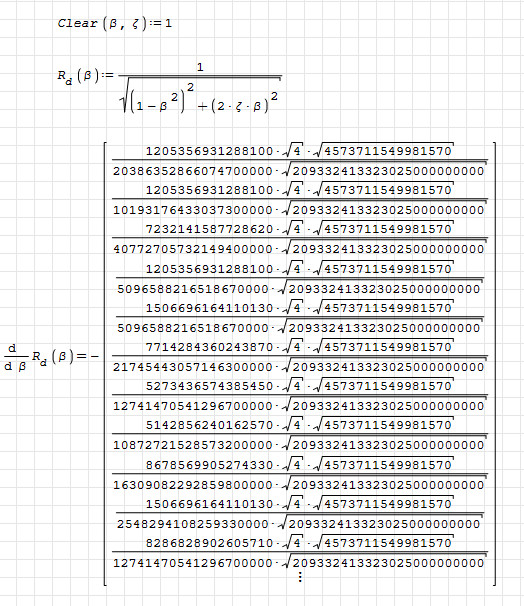
WroteThanks, but
Pay attention to this convention:
When you type ":" in SMath, you are assigning a value to a variable and SMath renders as: ":=" .
When you type "=", you are asking for the value of a variable, or evaluating a function, and SMath renders it as: "="
In your case, Clear() is a function, so, when you type "Clear(z[Ctrl+g],b[CTRL+g]):1" which renders:
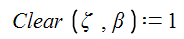
Here you must to type "1" and you are assigning the value "1" to "Clear(zeta,beta)" . This is wrong.
The correct syntaxis to evaluate the function Clear() is : "Clear(z[Ctrl+g],b[Ctrl+g])=" which renders:
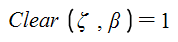
Here you don't type "1". The value "1" is an automatic response to evaluation of the function Clear(). It is the boolean answer of successfully having evaluated the Clear() function over the variables zeta end beta
Best,
Oscar
1位用户喜欢此帖子
netsonicyxf 2025/9/1 12:00:58
1页(4条)
- 有新帖
- 无新帖