
1页(5条)
Incorrect decimal places displaying - Result shows less digits after comma than set when rounding - 消息

Dear Andrey,
When I specify the number of decimal places in the result of any expression and the last digit is zero then it is also cut.
Sample:
I would expect to have 0,80, instead I get 0,8. It is confusing as reader does not know that I use two digits precision in my calculations.
Michał
When I specify the number of decimal places in the result of any expression and the last digit is zero then it is also cut.
Sample:
- Set value n:=0,798
- List value by typing n=
- Set number digits after comma to 2
I would expect to have 0,80, instead I get 0,8. It is confusing as reader does not know that I use two digits precision in my calculations.
Michał

Hello [userlink]m227[/userlink],
have you tried the "trailing zeros" option in the context menu?
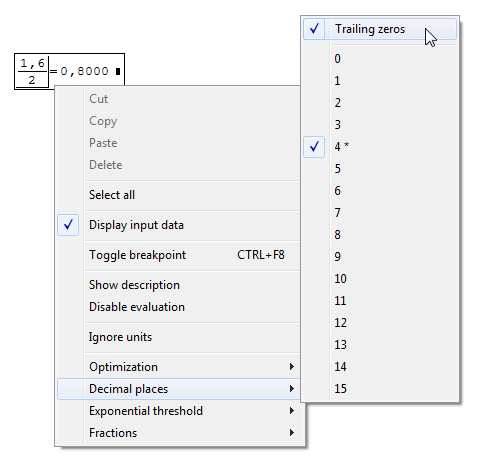
have you tried the "trailing zeros" option in the context menu?
If you like my plugins please consider to support the program buying a license; for personal contributions to me: paypal.me/dcprojects
Davide, you saved my day.
So this post can be deleted. I don't know how could I omit this, blind am I...
Probably this function should be set ON default?
Michał
So this post can be deleted. I don't know how could I omit this, blind am I...
Probably this function should be set ON default?
Michał

WroteProbably this function should be set ON default?
MichaÅ
Most of the times, I would vote for this option [show trailing 0's].
Other times would vote "NO". Option "show trailing 0's" enables to
line up decimal points in data tabulated from calculations.
Jean
WroteProbably this function should be set ON default?
I think would be possible to setup this as a global option that acts on new regions (like decimal places; tools -> options -> calculation).
BTS feature requesst: SS-2442
If you like my plugins please consider to support the program buying a license; for personal contributions to me: paypal.me/dcprojects
1页(5条)
- 有新帖
- 无新帖