
1页(6条)
Portable Smath - Probable link broken for the help menu choice - 消息

I apologize for posting this message here but have seen that is not possible to attach pictures under the topic "SMath Studio 0.97.5154 (10 February 2014)".
At least on my computer running both the releases of Smath Studio Desktop I see that clicking on the help menu choice shows up the below error message and the only options to open the handbook is to follow this approach: Tool -> PlugIn -> Interactive Books and then double click on Interactive Smath Handbook.
Best Regards
Franco
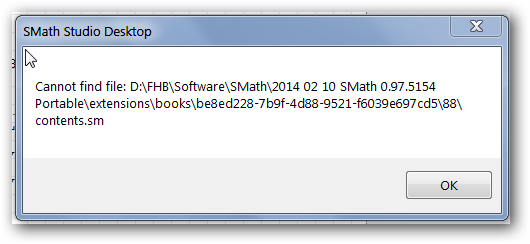
At least on my computer running both the releases of Smath Studio Desktop I see that clicking on the help menu choice shows up the below error message and the only options to open the handbook is to follow this approach: Tool -> PlugIn -> Interactive Books and then double click on Interactive Smath Handbook.
Best Regards
Franco
1位用户喜欢此帖子
Martin Kraska 2014/2/24 12:44:00

Confirmed
To fix the issue edit the settings.inf file;
change these two lines from:
to:
this can be made directly by Martin (the second line removed is just to clean the "recent files" menu)
in the same way you can simply change the portable distribution language editing
to
best regards,
Davide

To fix the issue edit the settings.inf file;
change these two lines from:
DefaultInteractiveTutorial=D:\FHB\Software\SMath\2014 02 10 SMath 0.97.5154 Portable\extensions\books\be8ed228-7b9f-4d88-9521-f6039e697cd5\88\contents.sm
Recent=D:\FHB\Software\SMath\Activebook\activebook\_Diag.sm|D:\FHB\Software\SMath\Activebook\activebook\_Min.sm|D:\FHB\Software\SMath\Activebook\activebook\Wish List.sm|D:\FHB\Software\SMath\Activebook\activebook\Algsys.sm|D:\FHB\Software\SMath\SMath Skript\SMath\Maxima\Update9.sm|D:\FHB\Forschung\Havelux\2014 02 06 Stauchversuch\Stauchung.sm|D:\FHB\Software\SMath\SMath Skript\Bilder\Maxima-draw-filledcurves_new.sm|D:\FHB\Software\SMath\SMath Skript\Bilder\Maxima-draw-filledcurves.sm|D:\FHB\Software\SMath\SMath Skript\SMath\Erste Schritte.sm|D:\FHB\Software\SMath\SMath Skript\Bilder\Draw2D3D.sm|D:\FHB\Software\SMath\Activebook\activebook\Maxima.sm|D:\FHB\Software\SMath\Activebook\activebook\contents.sm|D:\FHB\Software\SMath\2014 02 10 SMath 0.97.5154 Portable\extensions\books\be8ed228-7b9f-4d88-9521-f6039e697cd5\81\_Diag.smDefaultInteractiveTutorial=.\extensions\books\be8ed228-7b9f-4d88-9521-f6039e697cd5\88\contents.smthis can be made directly by Martin (the second line removed is just to clean the "recent files" menu)
in the same way you can simply change the portable distribution language editing
Language=GER
Units=gerLanguage=ENG
Units=engbest regards,
Davide
If you like my plugins please consider to support the program buying a license; for personal contributions to me: paypal.me/dcprojects
1位用户喜欢此帖子
Martin Kraska 2014/2/24 12:45:00

Hello
I just fixed this by choosing the Interactive SMath Habdbook as the default one from the extension manager.
The language of course can ba also changed from the Tools->options menu
Regards,
Radovan
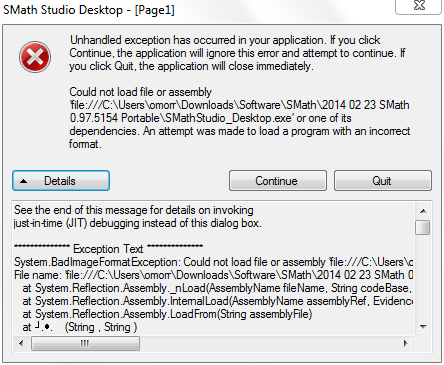
EDIT - By the way, running "SMathStudio_Desktop_64bit_only.exe" on my x64 machine will cause an unhandled exception.
I just fixed this by choosing the Interactive SMath Habdbook as the default one from the extension manager.
The language of course can ba also changed from the Tools->options menu
Regards,
Radovan
EDIT - By the way, running "SMathStudio_Desktop_64bit_only.exe" on my x64 machine will cause an unhandled exception.
When Sisyphus climbed to the top of a hill, they said: "Wrong boulder!"
WroteI just fixed this by choosing the Interactive SMath Habdbook as the default one from the extension manager.
Good, however an error message is a source of reports, so I think is better to fix the issue at the source

WroteThe language of course can ba also changed from the Tools->options menu
I know, but if you don't know where is located phisically the menu, may be not so easy
WroteEDIT - By the way, running "SMathStudio_Desktop_64bit_only.exe" on my x64 machine will cause an unhandled exception.
Confirmed
If you like my plugins please consider to support the program buying a license; for personal contributions to me: paypal.me/dcprojects
1位用户喜欢此帖子
Radovan Omorjan 2014/2/24 08:39:00
Moved post about X-Y region to Extensions forum
When Sisyphus climbed to the top of a hill, they said: "Wrong boulder!"
WroteWroteI just fixed this by choosing the Interactive SMath Habdbook as the default one from the extension manager.
Good, however an error message is a source of reports, so I think is better to fix the issue at the source
Done. Unofficial portable version updated. Settings file now contains relative links, which should work everywhere.
WroteWroteThe language of course can ba also changed from the Tools->options menu
I know, but if you don't know where is located phisically the menu, may be not so easy
Preset is english for UI and units.
WroteWroteEDIT - By the way, running "SMathStudio_Desktop_64bit_only.exe" on my x64 machine will cause an unhandled exception.
Confirmed
That's why the 32bit-compatible version is included. If you really want to use the 64bit version, then you can either ignore the error or remove the EFI for Mathcad plugin directory.
Technische Mechanik mit SMath Studio: https://link.springer.com/book/10.1007/978-3-658-50592-9
1位用户喜欢此帖子
Davide Carpi 2014/2/24 17:43:00
1页(6条)
- 有新帖
- 无新帖