
Maple Tools - Symbolic engine for SMath Studio. - 消息

You need to show me MapleTools.log file inside MapleTools directory. It appears then you close the SMath and set Debug to True in MapleTools.config file.
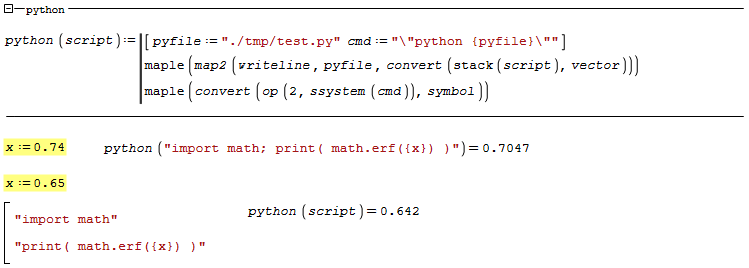
maple-system-python-math.sm (5.9 KiB)已下载 1642 次。
maple-system-python-math.sm (5.9 KiB)已下载 1642 次。
Russia ☭ forever, Viacheslav N. Mezentsev

Here is log file.
28.04.2023 21:46:25 [INFO ] [Plugin.Initialize()] SMath Studio Desktop 64-bit 1.0.8348.30405
28.04.2023 21:46:25 [INFO ] [Plugin.Initialize()] Maple Tools, version 1.1.8517.16356, 27-Apr-2023 09:05:12
28.04.2023 21:46:25 [INFO ] [Plugin.Initialize()] OS: Unix 6.1.25.1
28.04.2023 21:46:25 [INFO ] [Plugin.Initialize()] .Net: 4.0.30319.42000
28.04.2023 21:46:25 [INFO ] [Plugin.Initialize()] maple(1) - evaluate symbolic expression.
28.04.2023 21:46:25 [INFO ] [Plugin.Initialize()] Successfully. 1 function(s) loaded.
28.04.2023 21:46:25 [INFO ] [Plugin.Initialize()] Maple commander: /home/username/.config/SMath/extensions/plugins/32dfd679-8cfd-483a-b79a-19d5ea838750/1.1.8517.16356/bin/cmaple.exe
28.04.2023 21:46:25 [INFO ] [Plugin.Initialize()] Temp directory: ./tmp
28.04.2023 21:46:29 [INFO ] [->] map2(writeline,"./tmp/test.py",convert(smath_mat("import math; print( math.erf(0.74) )",1,1),vector))
28.04.2023 21:46:29 [INFO ] /home/username/.config/SMath/extensions/plugins/32dfd679-8cfd-483a-b79a-19d5ea838750/1.1.8517.16356/bin/cmaple.exe ./tmp/in.tmp
28.04.2023 21:46:32 [INFO ] [<-]
28.04.2023 21:46:32 [INFO ] [<-] mat(37,1,1)
28.04.2023 21:46:32 [INFO ] [->] convert(op(2,ssystem("\"python ./tmp/test.py\"" ),symbol)
28.04.2023 21:46:32 [INFO ] /home/username/.config/SMath/extensions/plugins/32dfd679-8cfd-483a-b79a-19d5ea838750/1.1.8517.16356/bin/cmaple.exe ./tmp/in.tmp
28.04.2023 21:46:34 [INFO ] [<-]
28.04.2023 21:46:34 [INFO ] [->] map2(writeline,"./tmp/test.py",convert(smath_mat("import math","print( math.erf(0.65) )",2,1),vector))
28.04.2023 21:46:34 [INFO ] /home/username/.config/SMath/extensions/plugins/32dfd679-8cfd-483a-b79a-19d5ea838750/1.1.8517.16356/bin/cmaple.exe ./tmp/in.tmp
28.04.2023 21:46:37 [INFO ] [<-]
28.04.2023 21:46:37 [INFO ] [<-] mat(12,24,2,1)
28.04.2023 21:46:37 [INFO ] [->] convert(op(2,ssystem("\"python ./tmp/test.py\""),symbol)
28.04.2023 21:46:37 [INFO ] /home/username/.config/SMath/extensions/plugins/32dfd679-8cfd-483a-b79a-19d5ea838750/1.1.8517.16356/bin/cmaple.exe ./tmp/in.tmp
28.04.2023 21:46:40 [INFO ] [<-]
28.04.2023 21:46:40 [INFO ] [->] smath_int(28561/160000,13/20)
28.04.2023 21:46:40 [INFO ] /home/username/.config/SMath/extensions/plugins/32dfd679-8cfd-483a-b79a-19d5ea838750/1.1.8517.16356/bin/cmaple.exe ./tmp/in.tmp
28.04.2023 21:46:42 [INFO ] [<-]
28.04.2023 21:46:42 [INFO ] [<-] proc()submatrix(el(args,1),el(args,2)..el(args,3),el(args,4)..el(args,5))endproc
28.04.2023 21:46:53 [INFO ] [->] smath_int(x^4,x)
28.04.2023 21:46:53 [INFO ] /home/username/.config/SMath/extensions/plugins/32dfd679-8cfd-483a-b79a-19d5ea838750/1.1.8517.16356/bin/cmaple.exe ./tmp/in.tmp
28.04.2023 21:46:55 [INFO ] [<-]
28.04.2023 21:46:55 [INFO ] [<-] 1/5*x^5
28.04.2023 21:46:58 [INFO ] [->] smath_int(x^4,x)
28.04.2023 21:46:58 [INFO ] /home/username/.config/SMath/extensions/plugins/32dfd679-8cfd-483a-b79a-19d5ea838750/1.1.8517.16356/bin/cmaple.exe ./tmp/in.tmp
28.04.2023 21:47:00 [INFO ] [<-]
28.04.2023 21:47:00 [INFO ] [<-] 1/5*x^5
28.04.2023 21:47:04 [INFO ] [->] smath_int(x^14,x)
28.04.2023 21:47:04 [INFO ] /home/username/.config/SMath/extensions/plugins/32dfd679-8cfd-483a-b79a-19d5ea838750/1.1.8517.16356/bin/cmaple.exe ./tmp/in.tmp
28.04.2023 21:47:07 [INFO ] [<-]
28.04.2023 21:47:07 [INFO ] [<-] 1/15*x^15
28.04.2023 21:47:19 [INFO ] [->] smath_int(x^14,x)
28.04.2023 21:47:19 [INFO ] /home/username/.config/SMath/extensions/plugins/32dfd679-8cfd-483a-b79a-19d5ea838750/1.1.8517.16356/bin/cmaple.exe ./tmp/in.tmp
28.04.2023 21:47:21 [ERROR] 008c:err:winediag:nodrv_CreateWindow Application tried to create a window, but no driver could be loaded.
008c:err:winediag:nodrv_CreateWindow L"The explorer process failed to start."
008c:err:systray:initialize_systray Could not create tray window
0114:err:winediag:nodrv_CreateWindow Application tried to create a window, but no driver could be loaded.
0114:err:winediag:nodrv_CreateWindow L"Make sure that your X server is running and that $DISPLAY is set correctly."
28.04.2023 21:47:21 [INFO ] [<-]
28.04.2023 21:47:21 [INFO ] [<-] 1/15*x^15
28.04.2023 21:47:24 [INFO ] [->] smath_int(x^13,x)
28.04.2023 21:47:24 [INFO ] /home/username/.config/SMath/extensions/plugins/32dfd679-8cfd-483a-b79a-19d5ea838750/1.1.8517.16356/bin/cmaple.exe ./tmp/in.tmp
28.04.2023 21:47:26 [ERROR] 008c:err:winediag:nodrv_CreateWindow Application tried to create a window, but no driver could be loaded.
008c:err:winediag:nodrv_CreateWindow L"The explorer process failed to start."
008c:err:systray:initialize_systray Could not create tray window
0114:err:winediag:nodrv_CreateWindow Application tried to create a window, but no driver could be loaded.
0114:err:winediag:nodrv_CreateWindow L"Make sure that your X server is running and that $DISPLAY is set correctly."
28.04.2023 21:47:26 [INFO ] [<-]
28.04.2023 21:47:26 [INFO ] [<-] 1/14*x^14
Try to add full path to python. I think the problem is in the paths. You need to understand how the python is called and what path to the script file is passed to it.

Russia ☭ forever, Viacheslav N. Mezentsev
This requires install numpy and matplotlib under python. Code of the example from here. A lot of examples for matplotlib here. Also, notice that the python window is interactive.

matplotlib.sm (5.25 KiB)已下载 1766 次。
Best regards.
Alvaro.
matplotlib.sm (5.25 KiB)已下载 1766 次。
Best regards.
Alvaro.
2位用户喜欢此帖子
Gnuplot.
You can install it using scoop: scoop install gnuplot

maple-system-gnuplot.sm (14.04 KiB)已下载 1678 次。
You can install it using scoop: scoop install gnuplot
maple-system-gnuplot.sm (14.04 KiB)已下载 1678 次。
Russia ☭ forever, Viacheslav N. Mezentsev
For better use Text Region uncheck this menu item.

Russia ☭ forever, Viacheslav N. Mezentsev
1位用户喜欢此帖子
churichuro 2023/5/4 14:49:00
Theoretically, we can connect ngspice for the calculation of electrical circuits.
Links:
1. ngspice - open source spice simulator
2. Ngspice example using py4spice package
Links:
1. ngspice - open source spice simulator
2. Ngspice example using py4spice package
Russia ☭ forever, Viacheslav N. Mezentsev
Hi, Uni.
This is just a newbie question but how do I insert the code from your last post?
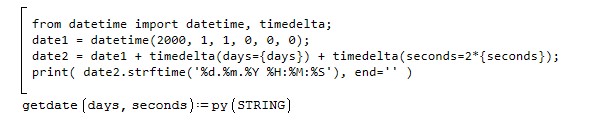
This is just a newbie question but how do I insert the code from your last post?
1位用户喜欢此帖子
Oscar Campo 2023/5/8 16:45:00
WroteHi, Uni.
This is just a newbie question but how do I insert the code from your last post?
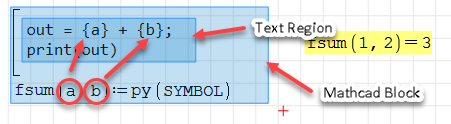
Use Text Region and Mathcad Block. Uncheck menu items with auto helpers and past the code from example. Set the operation for Mathcad Block to mat from the context menu. The Mathcad Block should cover the Text Region. In other words, the Text Region should be inside the frame of the Mathcad Block. It is important.
Russia ☭ forever, Viacheslav N. Mezentsev
2位用户喜欢此帖子
Russia ☭ forever, Viacheslav N. Mezentsev
2位用户喜欢此帖子
Hi. Usually, evalf (eval as float number) returns wrong results. Is there some workaround, like getting the string, or is it a bug which needs some solution?
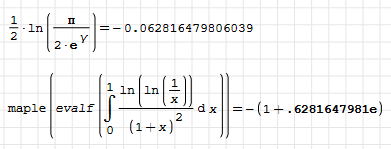
Thanks in advance.
Alvaro.
Thanks in advance.
Alvaro.
1位用户喜欢此帖子
sergio 2023/10/28 15:08:00
SMath can't convert a string to a number.

Try this

Try this
Russia ☭ forever, Viacheslav N. Mezentsev
2位用户喜欢此帖子
Wrote... Try this
Thanks, Viacheslav! convert fractional works fine.
Best regards.
Alvaro.
Hi.Perhaps a simple way to handle the different names between SMath and Maple could be to use "alias", and without much effort translate functions like arcsin, argument, Bessel and whatever you consider appropriate. If I'm not mistaken, you would only have to define the aliases before reading the SMath input, and it would not require any post-processing. Or maybe more adequate could be "macro". The list of Maple mathematical functions is this one. Others are under packages, like linalg.
Best regards.
Alvaro.
Best regards.
Alvaro.
1位用户喜欢此帖子
Oscar Campo 2024/12/26 09:25:00
In addition to names, parameter types also need to be converted. They need to be supported in both directions. As for trigonometric functions, the SMath tries to automatically work with names, which prevents them from being supported in the plugin in a controlled way.
Russia ☭ forever, Viacheslav N. Mezentsev
1位用户喜欢此帖子
Oscar Campo 2024/12/26 20:52:00
- 有新帖
- 无新帖