
Split math expression into multiple lines - Split math expression into multiple lines - 消息

WroteSometimes expressions get too long to stay within the margins.
A way to split math expressions into multiple lines would be great for presentation
of data in a clear way.
Ernesto,
That was a great feature of Mathcad. I do same as described by Ioan [decompose].
Eventually useful but useless in Smath, because the result from symbolic is in
many ways not treatable: very long coefficients, all expressed in rational form.
Jean
On the other hand, if your equation does not fit in a page, are we trying to do too much in one equation? I did run into this issue myself and I ended up separating things
WroteI would imagine Andrey could implement some sort of a wrap setting.
It is all text after all.
On the other hand, if your equation does not fit in a page, are we trying to do too much
in one equation? I did run into this issue myself and I ended up separating things
Easy in Mathcad, but might turn a blody mess.
Much easier to split in components in Smath and
lot more elegant.
Jean
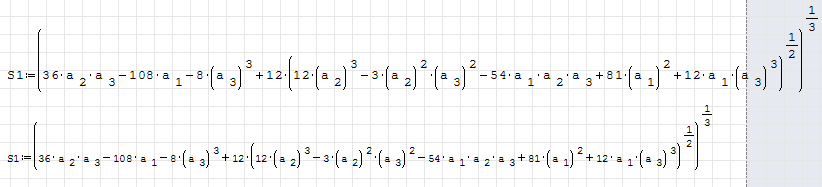
You shrank the font. This was not always easy in SMath (newer feature) and some old codgers yell and scream when the font sizes change in reports
 . As you said about Mathcad ...
I'm still holding on to Mathcad 15 for dear life (copied all license keys in triplicate) until I can transfer all or most of those sheets over to SMath.WroteThat was a great feature of Mathcad...
Jean
I really don't want to go through what you went through on your version of Mathcad


WroteImplemented (with some limitations) starting from SMath Studio 0.99.6619.
If something similar to Mathcad 8 Pro <= 11 ... useless.
It was demonstrated by Mathsoft, was never used by Collabs [> 125000 exchanges]
Hyper delicate to use as you had to first set the ONE line equation then split
by place holder/Enter. It could not be used for long symbolic derivatives whereas
symbolic expansion couldn't be collected.
I used it few times [typical Dirac symbolic integration].
The attached dates back two days ago, just refresh this morning.
BTW Andrey, from recollection, I think YOU gave Dragilev Parametric.
I have just made good use of it, delicate to make it profitable.
Wait few days for Contour Utilities to be attached.
Cheers Andrey, Jean
Contour_8 Hypersurface.sm (51.62 KiB)已下载 1784 次。
WroteIf something similar to Mathcad 8 Pro <= 11 ... useless.
I didn't use this is Mathcad as well, but as I see from the Internet there was some special operator "+" which allowed to make a line break.
If it is a true, then answer is - no, it is done by absolutely different way. Equation uses standard operators. Break is supported for "+", "-" and "*" when it is possible to break equation where user wants.
In my point of view implemented approach is very convenient to use. This is implemented for cases when equation is larger then a paper size, so this is the only elegant way to show large equations.
I'm still working on this feature, so I expect some improvements will be added soon.
WroteI didn't use this is Mathcad as well, but as I see from the Internet there was some special operator " " which allowed to make a line break.
If it is a true, then answer is - no, it is done by absolutely different way. Equation uses standard operators. Break is supported for " ", "-" and "*" when it is possible to break equation where user wants.
In my point of view implemented approach is very convenient to use. This is implemented for cases when equation is larger then a paper size, so this is the only elegant way to show large equations.
I'm still working on this feature, so I expect some improvements will be added soon.
Up to Mathcad 11, '*' was not supported.
I can see "split" useful if Smath can download from source a long single line formula.
As well useful to export a long single line equation split for export.
From within Smath ??? There was a Mathcad continued fraction converter to Wallis algorithm.
This one does not work anymore here, my MCD 11 is only a back2back system.
Courage Kamarad !
Maths Split_Collect.sm (139.03 KiB)已下载 1847 次。
Multiple realeases back to back AND one of my feature requests . Thank you!
WroteBreak is supported for "+", "-" and "*" when it is possible to break equation where user wants.
In my point of view implemented approach is very convenient to use. This is implemented for cases when equation is larger then a paper size, so this is the only elegant way to show large equations. I'm still working on this feature, so I expect some improvements will be added soon.
Sounds like this will automatically re-size? From the screenshot in the 6119 build, it looks like it's tied to the math region box (genius). Downloading BETA
WroteWOW ... just WOW!
OK, give an example of your WOWWOW
Does not correlate my previous Useless [or almost useless].
please, attach your demo WOWWoW
Makes it easier for the checker to follow. Trust me, I sometimes get lost in your sheets

sometimes the definition of a function requires multiple arguments and if you want them to be "self-explaining" (at least to a certain level) you have to use meaningful names for those. All these conditions might bring to a long line before you can type ":" and start with a definition line.
At this point, the space on the paper for statements along the function definition might become a bit tight and the definition itself might be not printable(anything falling out of paper limit will be cutout in printing).
Any chance to have a split at ":=" in order to have the function definition beginning at the left margin of paper?
Something like:
MyVeryLongFunction(OneNiceArgument, ASecondOne, ThisIsThird, Etc, Etc2, AnotherOne):=
|A:= OneNiceArgument + Etc2
|B:= ThisIsThird * AnotherOne
|Calculation:= .....
|ToBeContinued...
|....
Thanks for any help on this subject
Marco
WroteAny chance to have a split at ":=" in order to have the function definition beginning at the left margin of paper?
Something like:
MyVeryLongFunction(OneNiceArgument, ASecondOne, ThisIsThird, Etc, Etc2, AnotherOne):=
|A:= OneNiceArgument + Etc2
|B:= ThisIsThird * AnotherOne
|Calculation:= .....
|ToBeContinued...
|....
Yes, it is possible. After you have finished composing formula for definition just put the cursor before := and press Ctrl+Enter. This will produce something like

Best regards.
Marco
WroteThanks to everybody for the prompt answers.
Marco
Visit this manageable example SS 6179
Take care Marco ... Jean
Marco [Jean].sm (24.93 KiB)已下载 1611 次。
- 有新帖
- 无新帖